Mikshi Analyze 1.0: a Video‑Language Model for Real‑World Operator Intelligence.
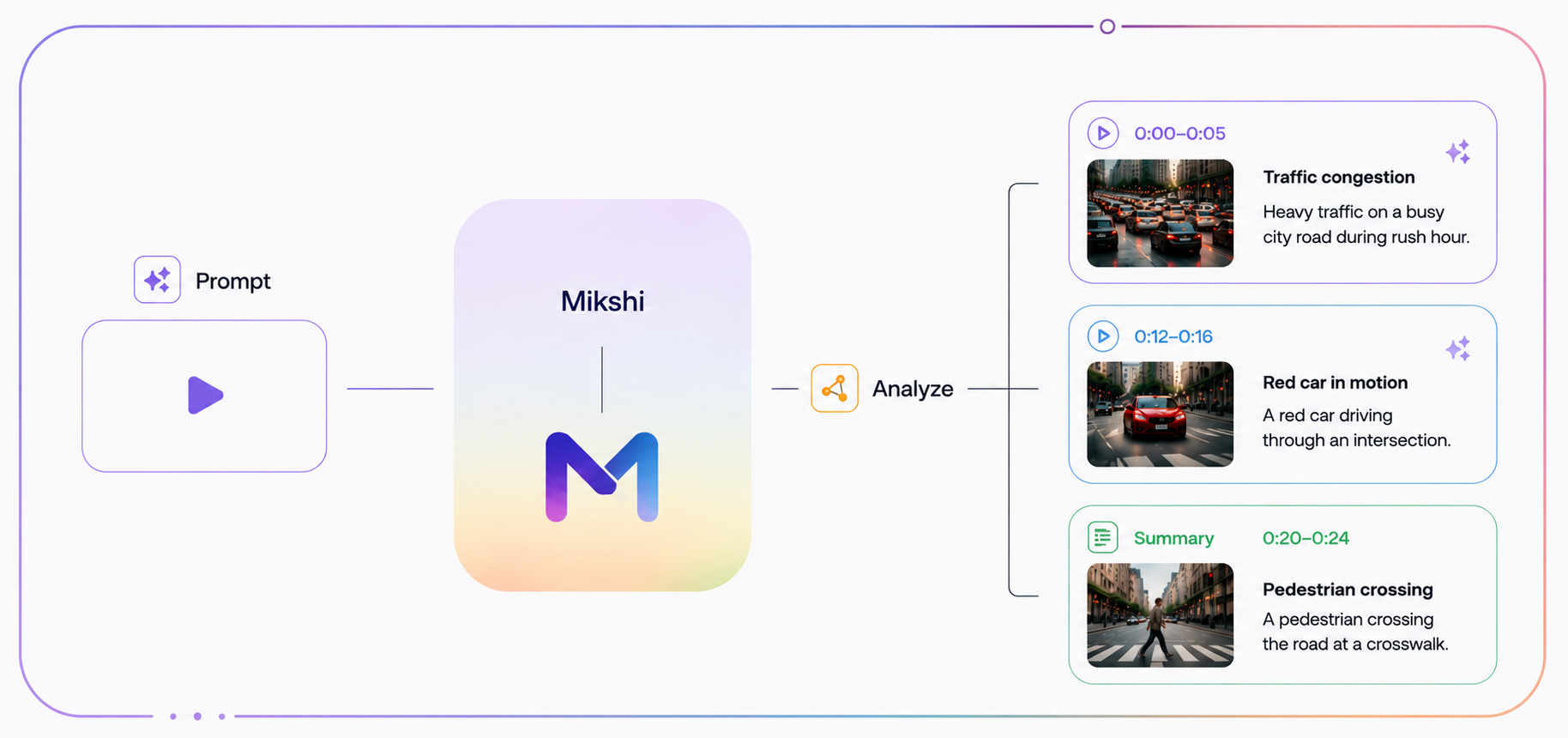
Mikshi Analyze is the video‑language model behind the platform. Given a video — a short clip, an uploaded recording, an hour‑long CCTV file, or a direct camera feed — it produces grounded natural‑language output describing what happened, answering questions about it, and flagging the moments that matter.
See our capability overview for how teams ship with it in production.
Introducing
Mikshi Analyze
1.0Five capabilities, one model. The same network describes a video, answers a question about it, holds a multi‑turn chat, locates an event in time, and flags what an operator needs to see next. They are not five models. They are five ways of prompting the same model.
One model. Five ways to ask.
You give Mikshi Analyze a video — anywhere from a few seconds to hours long — and a prompt (or a sequence of prompts in a chat). It returns natural‑language text grounded in what it saw, with timestamps embedded in the output.
Describe the video
Full-video narrative — end-to-end understanding, not per-frame captions.
Answer a question about it
Operators ask in natural language; the model answers from what it actually saw.
Chat across multiple turns
The model retains context across the full conversation, on the same video.
Locate an event in time
Returns timestamps, not paragraphs. Operators jump straight to the moment.
Flag what matters
Surfaces events grouped by severity — Critical, Warning, Info.
Built for full videos, including hour‑long footage.
Mikshi Analyze processes complete videos — not pre‑segmented clips. Hand it an hour of CCTV (or point it at a direct camera feed) and ask questions about anything that happened anywhere in it. No manual clipping. No pre‑segmentation. No requirement that you already know which moment to look at.
This is the property that makes Mikshi Analyze useful for operators: they don't have time to find the right minute before asking a question. They ask the question against the whole video.
Ask in your language. Get the answer in your language.
Mikshi Analyze supports 12 languages for both prompts and responses. A traffic operator in Delhi can query in Hindi; a security operator in São Paulo can query in Portuguese; a transit operator in Jakarta can query in Bahasa Indonesia. Same model, no per‑language fine‑tune.
Timestamps, severity labels, and grounded event descriptions all work across the full language set.
Severity is part of the model's output.
Every event Mikshi Analyze surfaces is labeled with one of three categories — emitted by the model, not layered on by a downstream rule. Operators see at a glance which moments demand action and which are background context.
Critical
Immediate operator action required — collisions, intrusions, fires, weapons, safety violations.
Warning
Notable deviations that should be reviewed but are not emergencies — unusual loitering, parking violations, restricted-area near-misses.
Info
Routine but query-relevant observations — vehicle counts, object presence, scene descriptions.
Timestamps are first‑class.
Mikshi Analyze treats time as part of its output, not as something recovered afterwards. When the model says "the vehicle ran the light at 00:14.3", the timestamp is a token the model generated, anchored to the frames it actually saw.
There is no separate alignment pass that could be wrong. That is what makes temporal grounding reliable enough for incident response, compliance, and investigation.
- 00:14.3Critical
White SUV (license partial: TN09‑••) ran the south stop sign without slowing.
- 12:08.7Warning
Person in dark jacket loitering near gate 3 for 4m 12s; no entry attempt.
- 47:51.0Info
Cargo van offloaded 6 pallets; bay clear at 49:02.
- 01:09:33.2Critical
Forklift operator entered exclusion zone without high‑vis vest.
What happened around 00:14?
A man in a navy jacket pushed open the side door at 00:14.6 and held it for two others who entered behind him.
Who was the person on the left?
Same person who walked through the lobby earlier at 00:08.1 — taller, carrying a black backpack.
Go back to that moment. Was anyone else with them?
Chat sessions are retained per video.
- Ask a question, get an answer. Ask a follow‑up — the model remembers prior turns.
- Leave the session, come back days later, pick up exactly where you left off.
- Hand the session to a different operator on the next shift without starting from zero.
Five capabilities, all from one model.
Pick one with a prompt; pick another by changing the prompt. There is no per‑task fine‑tune to manage, no second model to deploy.
Complex scene understanding
Distinguishes critical activity from background motion in dense feeds.
Temporal grounding
Locates events in time with sub-second precision; timestamps are emitted, not inferred.
Visual question answering
Natural-language interface over a video, supporting multi-turn follow-up questions.
Severity classification
Labels every event as Critical, Warning, or Info as part of the model's response.
Multi-turn chat
Retains session state and conversation history so operators can return to a video and continue the conversation.
Point it a video. Ask anything.
Mikshi Analyze turns hours of footage into grounded, time‑stamped answers an operator can act on.